








A company that uses AI is different from one that is built around it. Most businesses today are in the first group. They have added chatbots to customer portals, recommendation engines to dashboards, or automated a few workflows with scripts. That's helpful. But it doesn't come from AI.
AI-native development is very different from this. It's the process of building software from scratch with intelligence as the main part, not as an extra feature added later.
This guide explains what AI-native development really means, how it differs from what most companies do, what the architecture looks like in real life, and what it really takes to build systems that get smarter over time.
What is AI-Native Development?
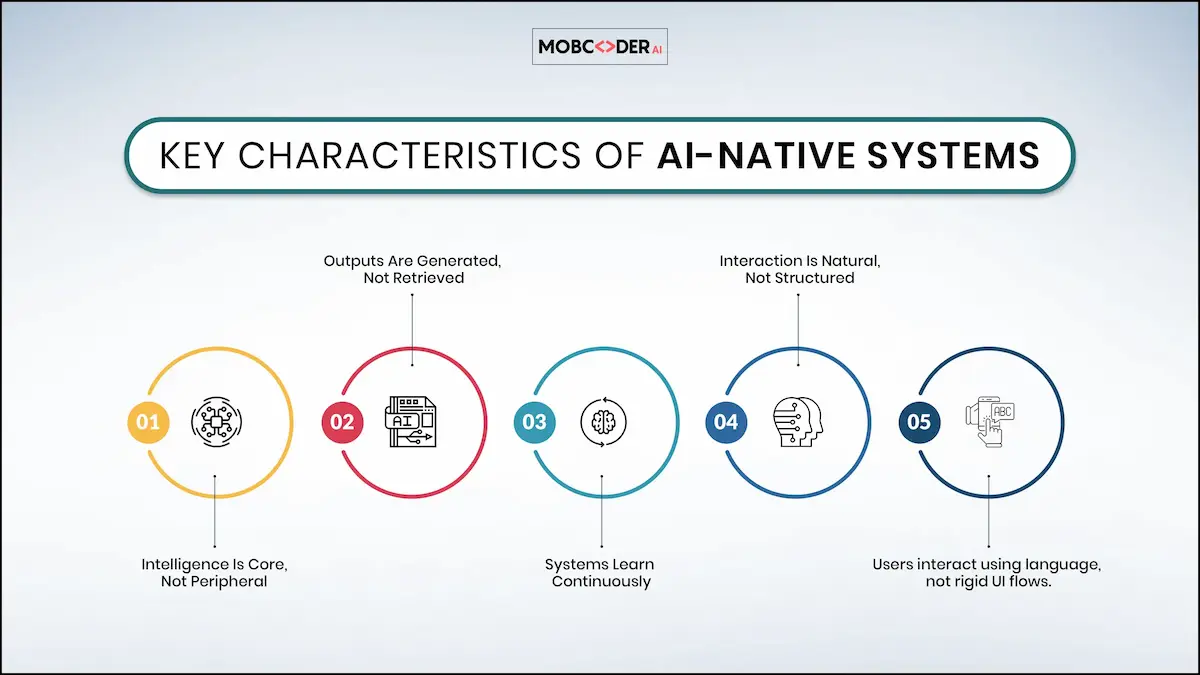
AI-native development means building software where AI is the main brain behind how everything works. It’s not just an extra feature, it’s the core of the product.
For example,
Think about a customer support chatbot:
- AI-powered (traditional approach): The chatbot follows pre-written scripts. If you ask something slightly different, it gets confused or sends you to a human.
- AI-native approach: The chatbot understands what you’re asking - even if you phrase it differently. It can respond naturally, ask follow-up questions, and improve over time based on past conversations.
What is the difference between AI-Native Development and AI-Powered Development
This is probably the most important difference to know, and a lot of teams get confused between the two.
AI-powered systems put AI on top of the architecture that is already there. The main logic stays the same. You could add a GPT-powered chatbot to your support portal or use a machine learning model to rate leads in your CRM. These are real changes for the better. But the system still works on traditional logic; it just has AI tools that it can use.
AI-native systems have different architectures. Intelligence doesn't help the system; it runs it. A model is the decision engine. The interaction layer is like a conversation. The workflow is made while the program is running, not before.
An AI-native support platform can understand what the user wants, get live data from internal systems, write and take resolution actions on its own, and learn from every interaction to make future handling better. There isn't a strict escalation tree; the model figures out what the next best step is and does it.
This is what the difference in architecture looks like:
- Artificial intelligence: UI → Backend Logic → Database → AI API (sometimes called)
- AI-native: User Intent → AI Models → Decision Engine → Action Layer → Feedback Loop
Key Components of AI-Native Architecture
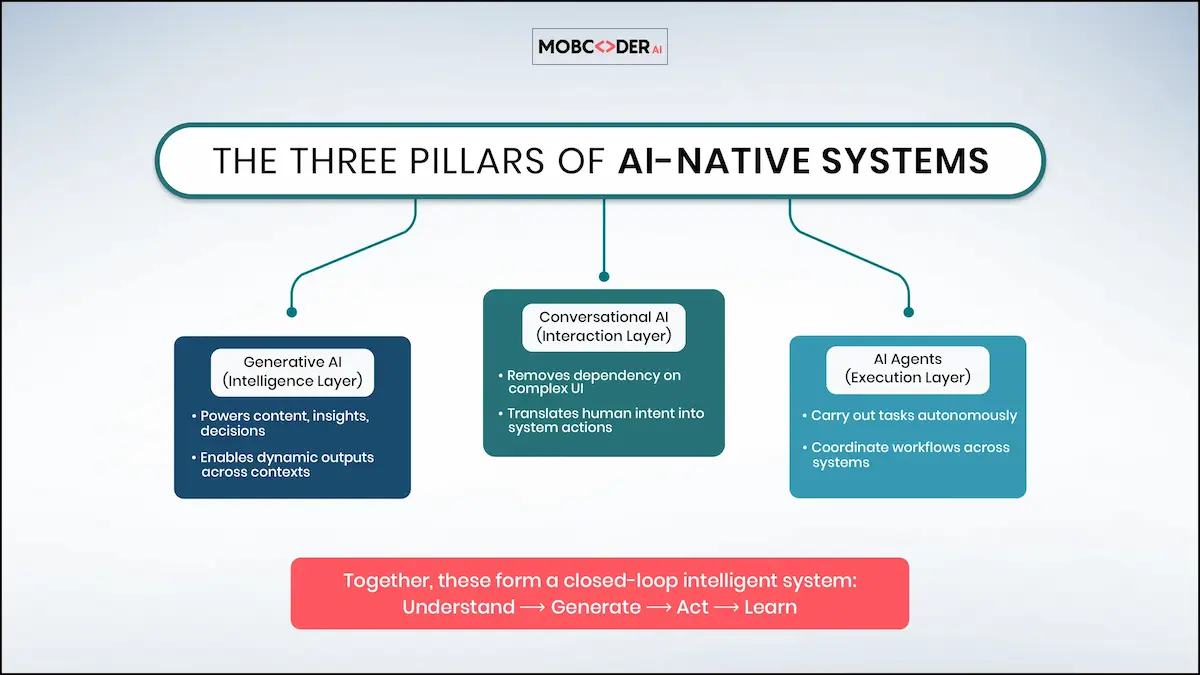
To really understand what makes a system AI-native, you need to know about its three main parts. These features don't work on their own; they all work together as one system.
1. The Intelligence Layer: AI that makes things up
Generative AI development is the part of an AI-native system that does the reasoning and generation. This is what lets the system give dynamic, context-aware responses instead of just pulling up pre-written ones.
This means that the system can give each user personalized financial advice, summarize complicated documents on request, write and review code, and make sense of unstructured data that traditional query logic can't handle.
The hard part isn't using generative AI; it's making it work reliably in the real world. When building AI-native systems, teams have to make tough architectural choices.
For example, they have to decide when to use fine-tuned models and when to use retrieval-augmented generation (RAG). They also have to figure out how to handle prompt engineering on a large scale, how to avoid hallucination in high-stakes workflows, and how to weigh output quality against latency and inference costs. These problems are not only AI problems; they are also engineering problems.
RAG has become a key part of AI-native systems for production because it lets models generate responses based on live, domain-specific data without the need for constant fine-tuning. A well-designed RAG pipeline greatly lowers the risk of hallucinations and keeps outputs up to date as the data changes.
2. The Interaction Layer: AI that talks to people
Conversational AI alters the interaction between users and software. Users don't have to learn how to use menus, fill out forms, or learn how to use the interface. Instead, they just say what they want, and the system understands and acts.
This is more important than it may seem at first. Structured input is what traditional UIs are all about. They help the system understand what you mean. They work, but the user has to do the translation. Conversational interfaces turn this around: the system takes in the uncertainty and does the translation.
This is a big step forward for enterprise software. Instead of teaching workers how to use a complicated analytics dashboard, they can just say, "Show me our best-selling products in Southeast Asia this quarter, compared to last year's numbers." The system knows what to do and answers.
Advanced conversational systems can do more than just follow simple commands. They keep track of the context during multi-turn sessions, figure out what unclear requests mean, customize responses based on user history, and know when to ask for more information and when to move on.
3. The AI Agents Layer for Execution
Agents are what make AI-native systems more than just smart interfaces; they make them work. An agent is an AI part that can do things like call APIs, write to databases, run code, send messages, and start workflows based on what it thinks needs to happen.
The evolution here is from a system that can understand and create to one that can understand, create, and act. A user requests a quarterly report. An agent then asks the data sources for information, organizes the results, writes the story, formats the document, and sends it to the user - all without any human involvement.
Multi-agent architectures (Agent2Agent) take this even further. Different agents work on different areas of the domain, talk to each other, and share context. A sales agent might find a high-value opportunity, give a research agent the background information it needs, and then give that information to a drafting agent that does the outreach. The system controls the chain, and each agent does what it's best at.
AI-Native Development Use Cases in Enterprises and Real-World Applications
Knowing where this is already working helps make the architecture more real.
- FinTech: AI-native wealth management platforms don't just show portfolio data. They also give users personalized investment advice, explain market changes in context, model possible outcomes, and let users know about opportunities or risks before they happen. The product is intelligence.
- Healthcare: AI-native clinical support systems combine patient histories, find relevant research, flag possible drug interactions, and create structured documentation. These are all tasks that used to take a lot of time for clinicians. To keep things accurate, the most important thing is to base generative outputs on verified clinical sources.
- Enterprise knowledge management: Big companies make a lot of internal documents, communications, and data that are hard to get to. AI-native knowledge systems make this information easy to find by using natural language. This connects employees to institutional knowledge that would otherwise require knowing the right person to ask.
- GovTech: AI-native systems are very useful in the area of regulatory compliance because they can automatically keep track of changes in regulations, map them to the processes that are affected, create compliance documentation, and point out any gaps. Because there are so many rules and they are so complicated, this is a good fit for AI-native methods.
The Challenges in AI-Native Architecture You Need to Plan For
AI-native development isn't always easier than traditional development; in some ways, it's harder. Teams that don't plan for these problems will have a hard time in production.
- Output reliability is the core challenge of generative AI in production. Models hallucinate. They produce confident-sounding wrong answers. For AI-native systems where model output drives real actions and user-facing responses, reliability engineering is as important as the model itself. This means implementing output validation, confidence scoring, citation grounding, and human review for high-stakes decisions.
- Context management at scale is harder than it looks. Conversational systems need to maintain coherent context across long, multi-session interactions. As context windows fill and session histories grow, retrieval and prioritization of relevant context becomes a significant architectural challenge.
- Inference costs at scale can be substantial. A consumer product with millions of daily active users making multiple model calls per session needs a cost architecture that doesn't make the unit economics unworkable.
- Governance and compliance are particularly important in regulated industries. Healthcare, financial services, and government applications need clear audit trails, explainability mechanisms, and human oversight for decisions that affect individuals.
These challenges are real but they're solvable with the right approach and the expert team.
With years of experience building complex digital products, Mobcoder AI brings together engineers and AI specialists who understand these systems end-to-end, and know how to take them from idea to production, the right way.
How to Transition an Existing System Toward AI-Native Architecture
Most companies aren’t starting from scratch, they already have systems in place. So moving to AI-native isn’t a one-time switch. It’s a gradual shift.
The best place to start is by looking at the parts of your system that struggle the most today, especially where rigid, rule-based logic falls short. These are usually tasks that involve complexity or human judgment, like handling customer issues, processing documents, or personalizing user experiences.
conversational Instead of rebuilding everything at once, start small. Replace these workflows one by one with AI-driven components.
For example:
- Add a conversational interface on top of your existing product so users can interact more naturally
- Let AI handle specific tasks while humans still review the output
- Gradually give AI more responsibility as it proves reliable
This approach helps teams learn, improve, and show results without taking big risks.
The goal isn’t just to “add AI” to your current system. It’s to slowly rethink how your workflows should work when intelligence is built in from the start.
And that requires a shift in mindset because you’re not just upgrading technology, you’re redesigning how your product thinks and operates.
Why Businesses Are Investing in AI-Native Development Aggressively
Businesses are increasingly partnering with AI development companies to build AI-native applications that go beyond automation. With advancements in generative AI, conversational AI, and AI agents, companies can now create systems that think, adapt, and act in real time.
This is why demand for AI development services is rapidly growing across industries, from fintech and healthcare to enterprise SaaS platforms.
Thinking about building an AI-native product or transforming an existing platform? The architecture decisions you make early have long-term consequences. Talk to our team about what an AI-native approach would look like for your specific context.