







Choosing an agentic AI framework is a real architectural decision, not a minor implementation detail - pick wrong and you're rewriting your agent stack six months in, once costs spike or your use case outgrows the framework's design. This guide compares the three frameworks most commonly evaluated for production agentic systems in 2026: LangGraph, CrewAI, and AutoGen.
What an Agentic AI Framework Actually Is
An agentic AI framework is a system of tools, rules, and components that helps AI agents think, act, and scale. Unlike a chatbot, which follows a simple input-output flow, agentic systems put an LLM inside a continuous loop where it can reason, make decisions, and take action. The framework isn't there to improve answers - it's there to help AI do things: solve multi-step problems on its own, choose the right tools dynamically, and catch and fix mistakes before they escalate.
A model gives you intelligence. A framework turns that intelligence into action.
How the Loop Actually Works
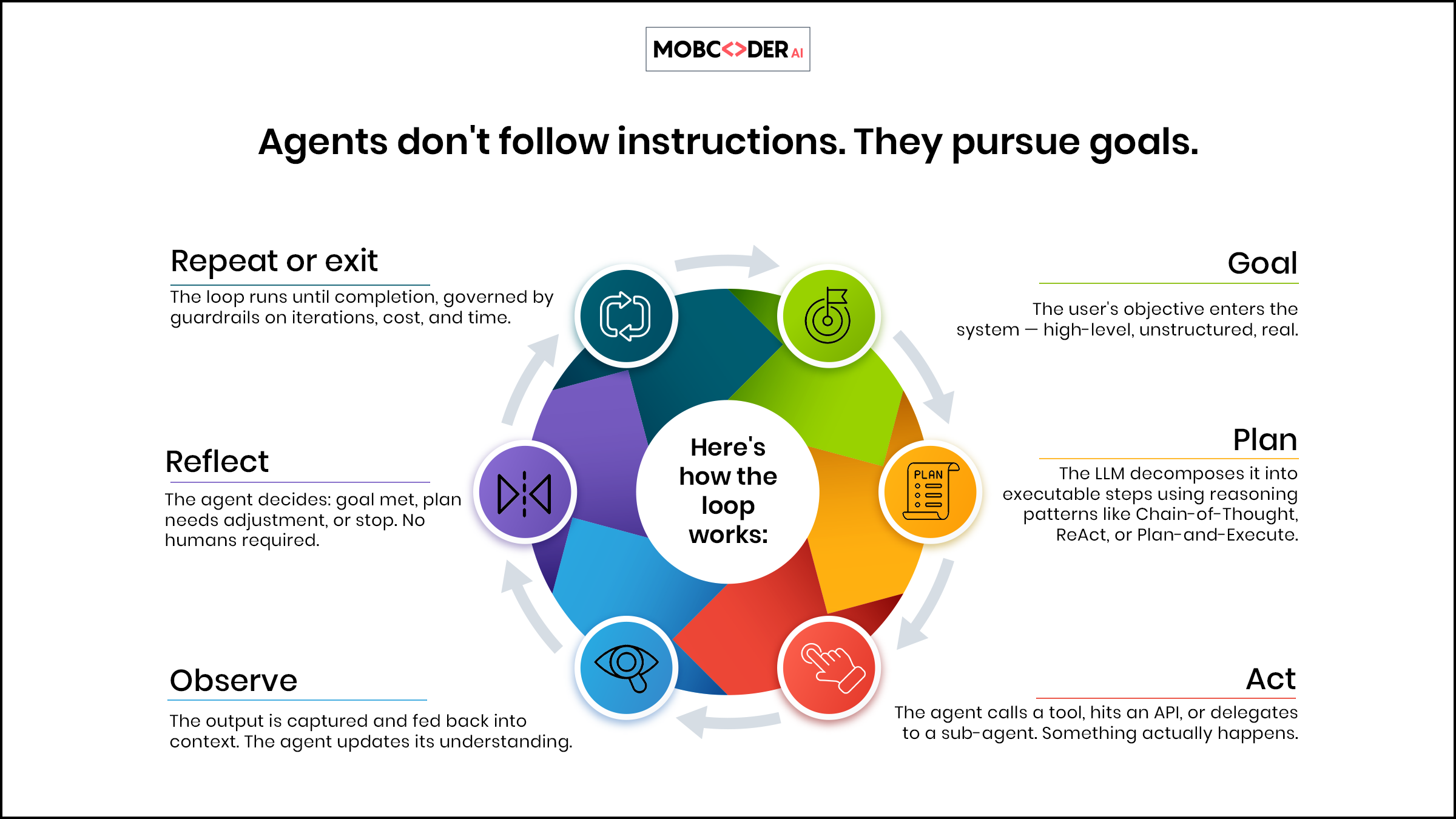
Agentic systems aren't linear - they run in loops:
user goal → agent plans → agent executes a tool → observes the result → re-plans → repeats → final output.
Take a customer message: "My order #45231 hasn't arrived. I've been waiting 10 days." A standard chatbot returns a templated response. An agentic system instead calls the orders API, detects the shipment is stuck in customs, queries the shipping partner's API for an updated ETA, checks whether the customer qualifies for compensation under company policy, drafts a personalized response with the correct ETA and a discount code, and escalates to a human if certain thresholds are triggered.
That's why enterprises are moving fast here - it's a genuine operational shift, not hype. It's also increasingly combined with generative AI development to build systems that both reason and create - drafting documents, generating code, or producing personalized content at scale.
LangGraph - The Production Standard
LangGraph models workflows as graphs, where nodes represent processing steps and edges define transitions. These graphs support cycles, conditional routing, persistence, interruptions, and human-in-the-loop workflows. Because you define the graph explicitly, you get deterministic control (you know exactly what runs when), checkpointing (pause and resume mid-execution), human-in-the-loop injection at any node, time-travel debugging (replay any prior state), and fine-grained error handling per node.
This is why LangGraph is increasingly the preferred choice for regulated industries - fintech, healthcare, legal - where auditability and workflow control matter more than raw development speed.
from langgraph.graph import StateGraph, END
from typing import TypedDict, Annotated
import operator

class AgentState(TypedDict):
    messages: Annotated[list, operator.add]
    tool_calls: list
    final_answer: str

def plan_node(state: AgentState):
    """LLM decides what to do next"""
    response = llm.invoke(state["messages"])
    return {"messages": [response]}

def tool_node(state: AgentState):
    """Execute the tool the LLM requested"""
    last_message = state["messages"][-1]
    tool_result = execute_tool(last_message.tool_calls)
    return {"messages": [tool_result]}

def should_continue(state: AgentState):
    """Decide: call another tool or finish?"""
    last_message = state["messages"][-1]
    if last_message.tool_calls:
        return "tools"
    return END

workflow = StateGraph(AgentState)
workflow.add_node("planner", plan_node)
workflow.add_node("tools", tool_node)
workflow.add_edge("tools", "planner")
workflow.add_conditional_edges("planner", should_continue)
workflow.set_entry_point("planner")

app = workflow.compile(checkpointer=checkpointer)
You define your state, your nodes (processing steps), and your edges (transitions). should_continue is a conditional edge - how the agent decides whether to keep looping or stop. The checkpointer enables pausing, inspecting, and resuming execution at any point.
Choose LangGraph when: you're building for a regulated industry, need full auditability of every agent decision, your workflow has complex branching or retries, you need human-in-the-loop approval gates, or you're deploying to production at scale and need reliable error recovery.
Avoid or defer when: your use case is a simple linear workflow, a quick demo, or a low-risk prototype where graph-level control is unnecessary overhead.
CrewAI - The Fastest Path to Multi-Agent Systems
CrewAI takes a different mental model entirely: instead of thinking in graphs, you think in roles. You define agents as members of a crew - each with a role, a goal, and a backstory - and define tasks. CrewAI handles much of the task sequencing and agent handoff logic, especially with predefined processes like sequential execution. It's closer to briefing a team of human specialists than designing a software pipeline, which makes it one of the more accessible frameworks for teams that know what they want agents to do but don't want to manage execution graphs.
from crewai import Agent, Task, Crew, Process

researcher = Agent(
    role="Senior Research Analyst",
    goal="Uncover the latest developments in AI agent frameworks",
    backstory="You're a senior analyst at a leading AI research firm with 10 years of experience.",
    tools=[search_tool, web_scraper],
    verbose=True
)

writer = Agent(
    role="Technical Content Writer",
    goal="Write engaging, accurate technical blog posts",
    backstory="You've written for major tech publications and understand both code and narrative.",
    tools=[],
    verbose=True
)

research_task = Task(
    description="Research the top 5 agentic AI frameworks in 2026. Focus on production adoption.",
    expected_output="A detailed report with framework names, use cases, and production evidence.",
    agent=researcher
)

write_task = Task(
    description="Write a 2000-word technical blog post based on the research provided.",
    expected_output="A complete, SEO-optimised blog post ready for publication.",
    agent=writer,
    context=[research_task]  # Writer gets researcher's output automatically
)

crew = Crew(
    agents=[researcher, writer],
    tasks=[research_task, write_task],
    process=Process.sequential
)

result = crew.kickoff()
Notice context=[research_task] - it passes the researcher's output directly to the writer automatically. You don't write graph transitions here; you write job descriptions.
Choose CrewAI when: your workflow maps naturally to human team roles, you need to prototype a multi-agent system in hours, agents need to collaborate and share context, or you're building content pipelines, research automation, or sales workflows and the people defining the workflow are product managers, not engineers.
Avoid if: you need deterministic, auditable, state-checkpointed execution.
AutoGen / Microsoft Agent Framework
AutoGen's concepts and abstractions are now part of Microsoft's broader Agent Framework direction, combining AutoGen-style multi-agent patterns with Semantic Kernel's enterprise capabilities. Agents send messages to each other; a group chat manager decides who speaks next. This conversational model is flexible - agents can negotiate, debate, and refine outputs collaboratively - which is why it became popular in research environments where you want agents to challenge each other's answers.
from autogen import AssistantAgent, UserProxyAgent, GroupChat, GroupChatManager

config_list = [{"model": "gpt-4o", "api_key": "your-api-key"}]

researcher = AssistantAgent(
    name="Researcher",
    llm_config={"config_list": config_list},
    system_message="You are an expert researcher. Gather facts and cite sources."
)

critic = AssistantAgent(
    name="Critic",
    llm_config={"config_list": config_list},
    system_message="You critically review research. Point out gaps and inaccuracies."
)

executor = UserProxyAgent(
    name="Executor",
    code_execution_config={"work_dir": "workspace"},
    human_input_mode="NEVER"
)

group_chat = GroupChat(agents=[researcher, critic, executor], messages=[], max_round=10)
manager = GroupChatManager(groupchat=group_chat, llm_config={"config_list": config_list})

executor.initiate_chat(
    manager,
    message="Analyze the performance of LangGraph vs CrewAI in production systems."
)
The group chat manager uses an LLM to decide who speaks next - powerful but non-deterministic, which can make behavior harder to reproduce in production. One practical advantage: AutoGen's built-in conversation logging captures every agent-to-agent message automatically, giving teams a structured, auditable record they can replay or use to fine-tune agent behavior over time.
Choose AutoGen when: you're in a Microsoft/Azure environment and want deep integration, you're doing research where agent debate improves output quality, your team already uses .NET or TypeScript (Semantic Kernel), or you need conversational multi-agent patterns.
Avoid if: you need deterministic, fully auditable workflows.
Making the Call
If someone asks "what's the best agentic AI framework," the honest answer is that it depends entirely on your use case.
Reliability and control matter most? Go LangGraph - especially in a domain where a bug or unexpected loop costs money, legal risk, or customer trust.
Speed and simplicity matter most? Go CrewAI - when you need something demonstrable quickly, your workflow maps to human team roles, and you can trade some control for developer velocity.
Conversational multi-agent collaboration or Microsoft-ecosystem alignment matters most? Go AutoGen - for research, synthesis, or debate-style tasks where agents challenging each other genuinely improves output.
Model Context Protocol (MCP): The Standardizing Layer
One development from 2025 every team building agentic AI should understand: the Model Context Protocol, an open protocol for connecting AI applications and agents to external tools, systems, and data sources through a standardized interface. Think USB-C for AI tool integration - instead of building a custom integration between your agent and every API it needs, you build one MCP adapter and the agent can use any MCP-compatible tool.
Many frameworks are adding MCP support natively or through adapters, though teams should verify compatibility, maturity, and security controls before relying on it. The practical benefit: tool integrations become portable - you can switch from LangGraph to CrewAI without rewriting your tool layer.
{
  "tool": "database_query",
  "parameters": {
    "query": "SELECT * FROM orders WHERE status = 'pending'",
    "database": "production_crm"
  },
  "mcp_version": "1.0"
}
The agent interacts through a standardized interface while the MCP server/gateway handles connection logic and tool-specific details - though authentication, authorization, and permission scoping still need to be explicitly designed and secured. The session transcript captures every tool call, giving you a complete audit trail.
Production Deployment Checklist
Building an agent that works in a notebook is very different from running one reliably in production.
Observability: instrument every node/step with traces, log every LLM call with input/output tokens and latency and cost, set up alerts for unexpected loops or cost spikes.
Cost control: set maximum iteration limits on every agent loop, use cheaper models (Claude Haiku, GPT-4o-mini) for simple tool-call decisions and reserve frontier models for complex reasoning, implement per-task token budgets.
Error handling: define explicit fallback behavior for every tool failure, implement retry logic with exponential backoff for transient errors, add circuit breakers so agents don't hammer a failing API.
Security: never pass raw user input directly as agent goals without sanitization, implement tool-call allowlists so your agent can only call explicitly approved tools, use read-only database connections wherever possible.
Human-in-the-loop gates: add a human approval step for any action that writes to a production system, and define clear escalation paths for when the agent should stop and ask.
How We Approach This
Our typical engagement follows four stages: mapping your business process to an agent workflow and selecting the right framework for your compliance and scale requirements; building a working prototype with real data to establish accuracy, latency, and cost baselines; hardening for production with observability, error handling, and security guardrails (the phase most teams underestimate, and where most production failures actually originate); and deploying with continuous monitoring and a feedback loop.
If you're evaluating whether agentic AI is right for a given process, the useful question is: would this task be done better by a team of specialists working in sequence, or by a single person following a checklist? If it's the former, it's a strong candidate for a multi-agent system.